 Saizul Amin
From the XBD team: XBD (Xplore Brand Differently) is a digital growth agency in Dhaka working on SEO, websites, social media, design, branding and video for brands in Bangladesh, the UK and the USA. This guide is based on how we work with clients day to day. Last reviewed: October 2026.
When someone searches for what you sell, your business either appears or it does not. SEO (search engine optimization) is the work that makes it appear, and for a small business it is one of the few marketing channels where the effort keeps paying after you stop. This guide explains what to do, in what order, without jargon or tricks.
How Google decides who ranks
Google does three things: it crawls pages, indexes what it finds, and ranks pages for each search by relevance and quality. Your job is to make your site easy to crawl, clear about what each page is for, and genuinely more helpful than the alternatives. Nothing here is magic: it is technical hygiene plus useful content plus trust.
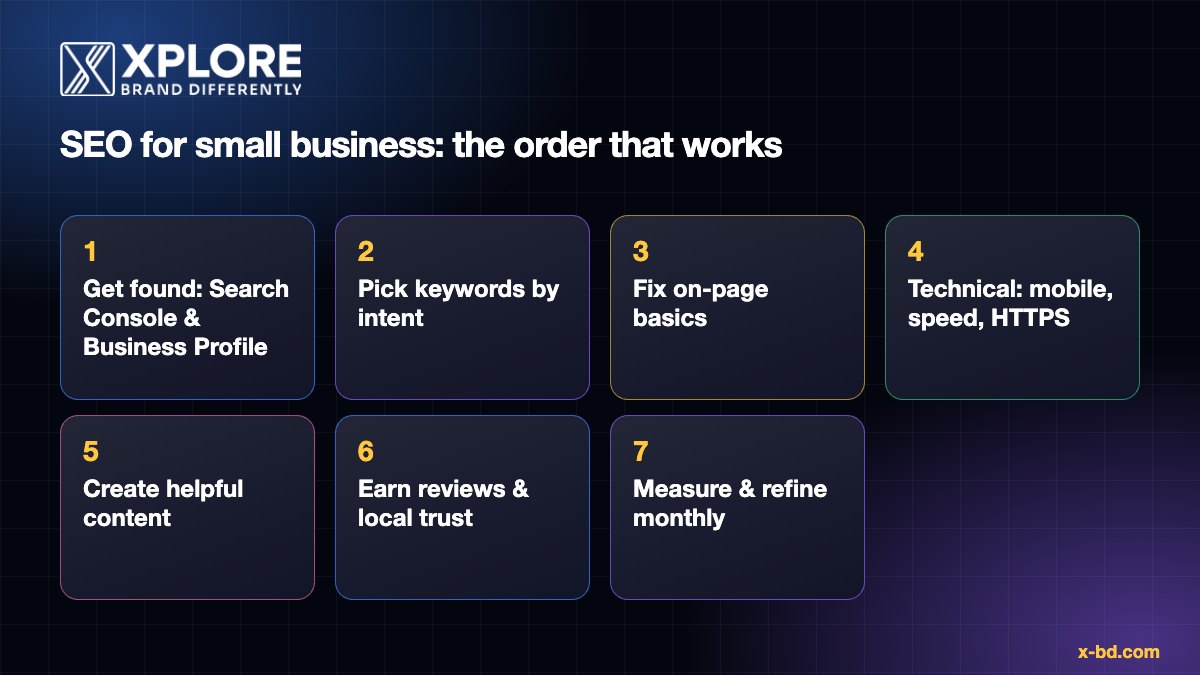
Step 1: Be findable (Search Console and Google Business Profile)
- Google Search Console (free): verify your site, submit your sitemap and check for indexing problems. It also shows the real searches that bring visitors.
- Google Business Profile (free): essential if customers come to you or you serve an area. Fill in every field: categories, services, hours, photos, website and phone. Keep name, address and phone number identical everywhere online.
- Google Analytics 4: track what visitors do (calls, form submissions, purchases) so you can judge SEO by results.
Step 2: Choose keywords by what customers actually search
Write down what you sell and the problems you solve in your customers’ words, then check how people search for them with Google autocomplete, “People also ask” and Search Console.
| Intent | Example search | Page type that fits |
|---|---|---|
| Wants to buy or hire | “web design company in Dhaka” | Service page |
| Comparing options | “best CRM for small business” | Comparison or guide |
| Wants to learn | “how to get more Google reviews” | Blog article |
| Looking for a place | “dentist near me” | Location page + Business Profile |
Rule: one main keyword per page. Two pages targeting the same search compete with each other. Before writing a new page, check whether an existing one should be improved instead.
Step 3: Fix on-page basics
- Title tag (around 50–60 characters): main keyword first, written for people.
- Meta description (around 150 characters): a clear promise. It does not rank pages but it affects clicks.
- One H1 per page, then logical H2/H3 headings that answer the questions your customer has.
- Answer the question early, then add depth, examples and proof.
- Images: compressed, with descriptive file names and alt text.
- Internal links with descriptive anchor text between related pages (services ↔ articles).
- A clear next step on every page: call, WhatsApp, form.
Step 4: Technical basics that cannot be skipped
- Mobile first: most searches happen on phones. Test your key pages on a real phone.
- Speed: aim for fast loading and stable layout (see Google’s Core Web Vitals). Compress images, use caching and good hosting.
- HTTPS everywhere, and a single canonical address (with or without
www). - XML sitemap and robots.txt that do not block important pages.
- Structured data where it applies: Organization or LocalBusiness, Article, Breadcrumb.
- No broken pages: fix 404s and redirect moved URLs with 301s.
Step 5: Create content that is genuinely helpful
Google’s guidance on helpful content boils down to: write for people, show real experience, be accurate and be better than what already exists. For a small business that means:
- A strong page for each service you sell, with process, pricing guidance, FAQs and examples of your work.
- Articles that answer the questions customers ask before they buy.
- Case studies with real details (the problem, what you did, the result).
- Updates: improve and refresh your best pages instead of letting them age.
Quality beats volume. A small number of thorough, linked pages outperforms dozens of thin ones.
Step 6: Earn reviews and local trust
- Ask every happy customer for a Google review, with a direct link, right after the job.
- Reply to every review, good or bad, politely and specifically.
- Get listed accurately in relevant directories and local business sites.
- Earn links by being useful: local partnerships, supplier or client pages, press, community events. Avoid buying links; it violates Google’s spam policies.
Step 7: Measure and refine every month
| What to check | Where | What to do with it |
|---|---|---|
| Impressions, clicks, queries, position | Search Console | Improve pages ranking on page two; write for queries you did not target |
| Calls, forms, WhatsApp clicks | GA4, Business Profile | Judge SEO by leads, not traffic |
| Indexing and errors | Search Console | Fix problems quickly |
| Reviews and rating | Business Profile | Keep asking, keep replying |
How long does SEO take?
Local and low-competition terms can move within weeks; competitive terms take months. Treat SEO as an asset you build, not a switch. Check progress over 8 to 12 weeks, not days.
Common small-business SEO mistakes
- One generic page trying to rank for everything.
- Ignoring the Google Business Profile.
- Copying competitor text or using unedited AI content.
- Changing titles and URLs constantly.
- Paying for “guaranteed #1” promises. Nobody can guarantee rankings.
How XBD can help with SEO
XBD is a digital growth agency in Dhaka. For SEO we run a technical audit, build the keyword and content plan, fix on-page and internal-linking problems and report monthly on what matters: visibility, enquiries and sales. One of our projects was a recovery plan for a UK education website with roughly 600 articles whose traffic had dropped, built around pillar pages, cluster content and a strict internal-linking model.
See our SEO service, review our work or request a free audit.
Frequently asked questions
How much does SEO cost for a small business?
It depends on competition, your site’s starting point and the amount of content needed. Doing the basics yourself costs mainly time; agencies scope monthly or project-based work after an audit. Be wary of fixed “guaranteed ranking” packages.
Can I do SEO myself?
Yes, the basics in this guide are doable with time and discipline. Hire help when the technical side, content volume or competition is beyond what you can handle.
Is SEO better than ads?
They do different jobs. Ads bring fast traffic that stops when you stop paying. SEO is slower but compounds. Many businesses use both.
Do I need a blog for SEO?
Not always. Strong service and location pages come first. A blog helps when you can answer customer questions better than others.
Does social media help SEO?
Not directly as a ranking factor, but it can bring visitors, mentions and links. See our guide to social media marketing for small business.
Sources and further reading
- Google Search Central: SEO Starter Guide
- Google Business Profile Help
- Google: Creating helpful, people-first content
- web.dev: Core Web Vitals
How this article was written
This article was written by the XBD team from hands-on client experience. Platform and policy details were checked against the official documentation linked above in October 2026. Tools, policies and prices change, so if you notice anything out of date please email info@x-bd.com and we will correct it.