 Saizul Amin
From the XBD team: XBD (Xplore Brand Differently) is a digital growth agency in Dhaka working on SEO, websites, social media, design, branding and video for brands in Bangladesh, the UK and the USA. This guide is based on how we work with clients day to day. Last reviewed: October 2026.
Video is now the format most people reach for to learn what a business does and whether to trust it. But “make a video” is not a plan. Videos that work have a clear purpose, a strong first few seconds and are edited for how and where they are watched: on a phone, often without sound. This guide covers the formats, a simple workflow, the technical settings and what it costs.
The video types every business should know
| Format | Length | Use it for |
|---|---|---|
| Reels, Shorts, TikToks (vertical 9:16) | 15–60 seconds | Reach, tips, teasers, behind the scenes, quick demos |
| Ad creative | 15–30 seconds | Paid campaigns on Facebook, Instagram and YouTube |
| Product or commercial video | 30–60 seconds | Launches, e-commerce pages, brand storytelling |
| Explainer / how-to | 1–5 minutes | Teaching, onboarding, FAQs, website pages |
| Testimonial / case study | 1–3 minutes | Trust and proof |
| Long-form YouTube | 8–20+ minutes | Authority, search visibility, community |
Before you shoot: define the video
- One goal: awareness, leads, sales or education.
- One audience and one message. If you try to say five things, nobody remembers any.
- One action: visit, message, call, buy.
- A simple script or outline (hook, content, call to action).
Shooting basics that save editing time
- Sound is half the video. Record in a quiet place and get the microphone close; a cheap clip-on microphone beats the phone microphone.
- Light from the front or side, near a window if possible; avoid mixed lighting.
- Shoot vertical (9:16) for social, horizontal (16:9) for YouTube and websites. Keep important content away from the edges.
- Hold steady or use a tripod; record a few seconds of extra footage before and after each clip.
- Capture b-roll (cutaways of the product, place or process) to cover cuts.
The editing workflow
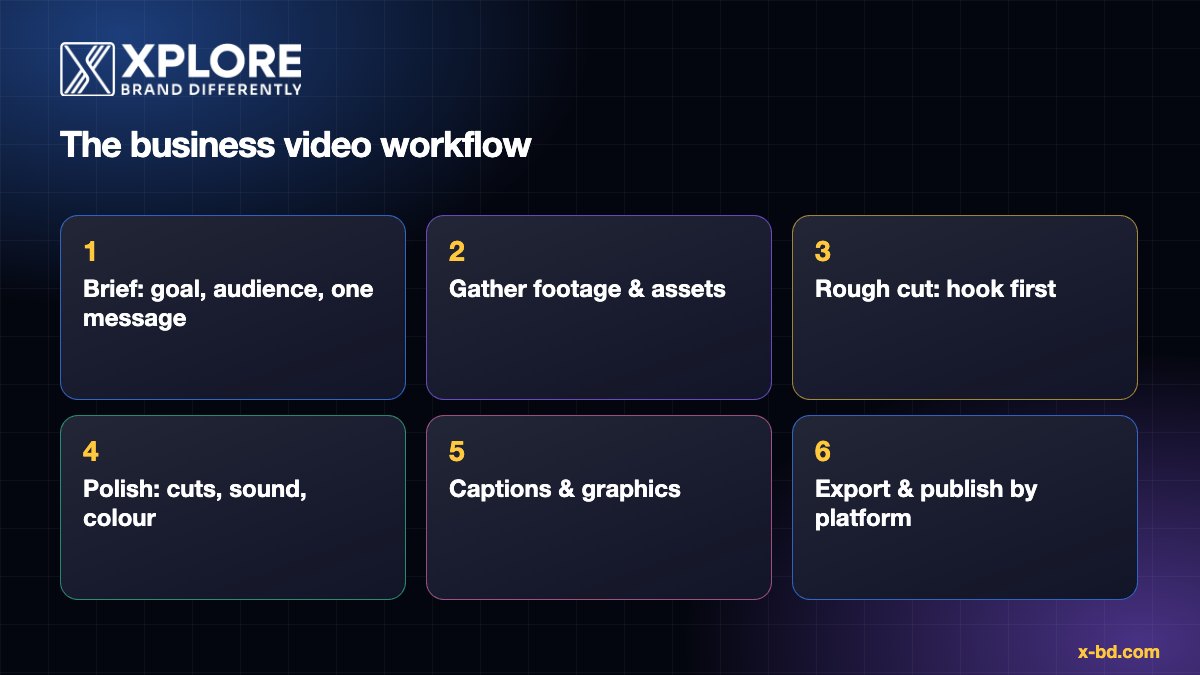
1. Organise
Put clips, music, logos and fonts in one folder, named clearly. Decide the final format and length first.
2. Rough cut: hook first
Assemble the story and cut everything that does not serve the message. On social video, the first one to three seconds decide whether people stay: lead with the result, a surprising fact or the question you answer, not a logo animation.
3. Tighten pacing
Remove pauses and filler words, change the visual (angle, zoom, b-roll or text) every few seconds to keep attention, and keep a clear rhythm with the music.
4. Sound
Clean the voice, level music under speech (music about 15 to 20 dB below voice is a common starting point) and use licensed or royalty-free music only.
5. Colour and brand
Correct exposure and white balance first, then apply a consistent look. Use your brand colours, fonts and logo placement on titles and lower thirds.
6. Captions and graphics
Add captions: many people watch with the sound off, and captions also help accessibility. Keep them large, high contrast and within the safe area so interface elements do not cover them. Use simple motion graphics to emphasise key points.
7. Call to action and end
Say what to do next in words and on screen, and keep it to one action.
Export settings that work
| Platform | Aspect ratio | Resolution | Notes |
|---|---|---|---|
| Reels / Shorts / TikTok | 9:16 | 1080 × 1920 | MP4 (H.264), keep key content in the central safe area |
| Feed videos | 4:5 or 1:1 | 1080 × 1350 / 1080 × 1080 | Good for the Facebook and Instagram feed |
| YouTube | 16:9 | 1920 × 1080 or higher | See YouTube’s recommended encoding settings |
| Website embed | 16:9 | 1280 × 720 or 1920 × 1080 | Host on YouTube or Vimeo; avoid heavy self-hosted files |
Tools: DIY or hire?
- Beginner-friendly: CapCut, Canva video, VN, InShot.
- Professional: Adobe Premiere Pro, DaVinci Resolve, Final Cut Pro; After Effects for motion graphics.
Editing yourself is fine for occasional videos. Hire an editor when you publish regularly, need a consistent branded look, or the time is better spent on running the business.
What does video editing cost?
Price depends on length, style and complexity: a clean basic edit costs less than a high-energy ad with motion graphics and sound design. At XBD our packages have clear starting prices:
| Package | 15 sec | 30 sec | 60 sec |
|---|---|---|---|
| Generic edit (clean, informational) | from $20 | from $35 | from $60 |
| Pretty edit (polished, branded) | from $35 | from $60 | from $95 |
| Dynamic edit (ads, Reels, Shorts) | from $60 | from $110 | from $180 |
| Commercial / product | n/a | from $120 | from $220 |
Add-ons include subtitles/captions, script-based motion graphics, stock footage integration and voice-over sync. Final prices depend on scope and complexity; see our pricing page.
What to send an editor
- The goal, audience and platform.
- Raw footage in the highest quality, plus logos, fonts and brand colours.
- A script or outline, and two or three example videos you like.
- Required length, aspect ratio and deadline.
- Any text, prices or offers that must appear exactly.
Common mistakes
- Long intros and logo animations before the point.
- No captions.
- Poor audio.
- Using copyrighted music without a licence.
- Trying to make one video fit every platform without reformatting.
Video editing at XBD
XBD edits reels, shorts, promos and product videos with captions, motion graphics and brand styling. Packages have clear starting prices on our pricing page, and we can work from your raw footage or script. See the video editing service or send us your project.
Frequently asked questions
How long should a business video be?
As short as it can be while delivering the message. Many social videos work best under 30 to 60 seconds; tutorials and testimonials can run longer if they stay engaging.
Do I need professional equipment?
No. A modern phone, good light and clear audio are enough to start. Editing and storytelling matter more than the camera.
Should every video have captions?
Yes, for social video. They help viewers who watch muted and improve accessibility.
Can I reuse one video on every platform?
Reuse the content, but re-export in the right ratio and adjust the opening and captions for each platform.
How many videos should I post?
Consistency beats volume. One to three well-made videos a week is a strong, sustainable start for a small business. See our social media plan.
Sources and further reading
How this article was written
This article was written by the XBD team from hands-on client experience. Platform and policy details were checked against the official documentation linked above in October 2026. Tools, policies and prices change, so if you notice anything out of date please email info@x-bd.com and we will correct it.